Technical Architecture: NovaGlow AI
Customer Support Agent Walkthrough
A detailed system analysis of the n8n automation and Supabase pgvector RAG loops.
01 — End-to-End Support Agent Workflow
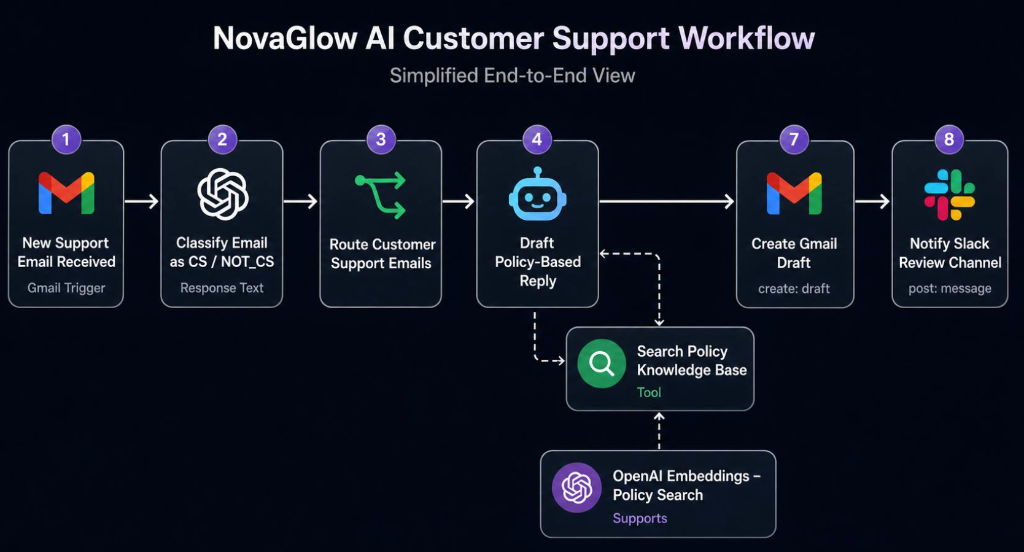
This workflow handles inbound emails, classifies content, retrieves skincare guidelines via similarity searches, drafts automated brand responses, and posts notifications to the support team's Slack channel.
-
Node 1: New Support Email Received (Gmail Trigger)Ingests incoming user messages via Gmail API hooks, parsing raw text, metadata, and attachment references.
-
Node 2: Classify Email as CS / NOT_CSAn OpenAI routing node classifies the request intent, analyzing whether it relates to product guidelines, orders, or spam.
-
Node 3: Route Customer Support EmailsA conditional routing switch filters spam out and passes valid customer queries directly to the drafting loop.
-
Node 4: Draft Policy-Based Reply & Search Knowledge BaseQueries the vector base using similarity match thresholds. If a matching skincare guideline or policy chunk is found, OpenAI drafts the brand response.
-
Node 7: Create Gmail DraftSaves the brand-grounded response directly as a draft inside the support team's inbox, ready for instant review.
-
Node 8: Notify Slack Review ChannelPushes an interactive notification card with the original query, drafted reply, and approval links directly to the review team in Slack.
02 — Knowledge Base Upload & Vectorization
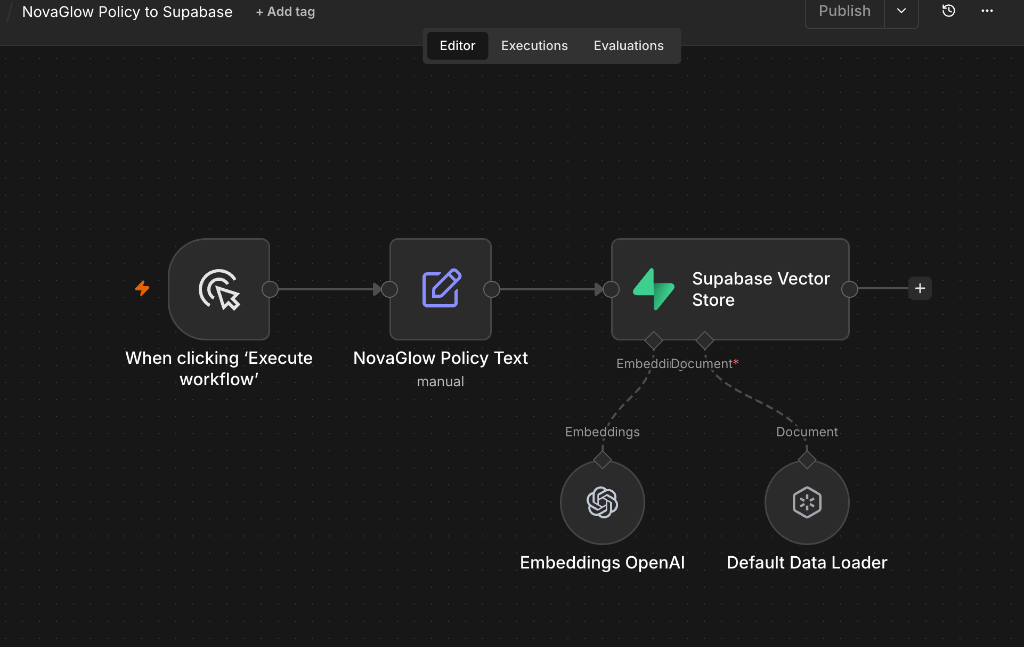
This secondary workflow manages the ingestion and embedding of raw skincare documents and policy texts, storing the result in the Supabase Vector Database.
-
Step 1: Ingestion TriggerTriggers manually or via file additions inside n8n to ingest new brand document versions.
-
Step 2: Policy Chunk ParsingChunks the raw policy manuals into structured blocks to prevent context limit errors and maintain clean embeddings.
-
Step 3: OpenAI Embeddings & Vector StoreEmbeds the text blocks via `text-embedding-3-small` and populates the Supabase Vector Store database (`novaglow-ai-support`).